How to Download Facebook Videos in HD - SnapSave
Want to save Facebook videos to your gallery without complex software? SnapSave.ai provides a seamless, web-based solution to download any FB video to your PC, iPhone, or Android in just seconds. Experience the fastest way to keep your favorite social content offline.
SnapSave is a leading online Facebook downloader, specializing in high-definition content. Our unique Render HD+ technology allows you to save videos in 1080p, 2K, and even 4K quality with crystal-clear audio. No installations, no fees—just pure quality directly through your browser.
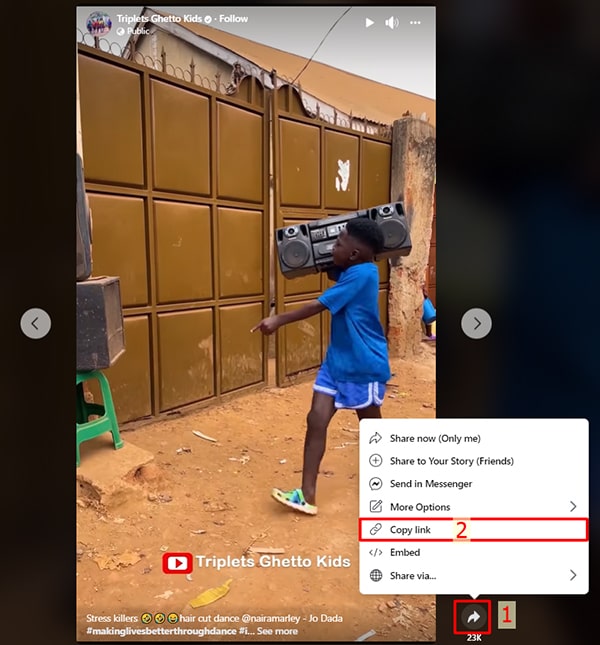
Step 1: Copy the Facebook Video Link
On Desktop or Mobile (Android, iPhone): Find the video you want, click Share and select Copy Link.
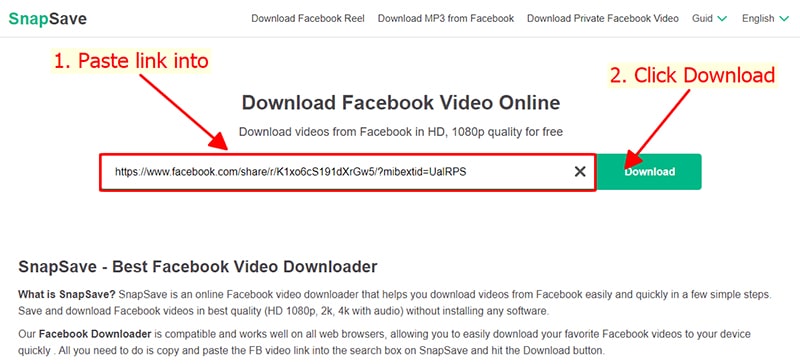
Step 2: Paste the URL into SnapSave
Go to SnapSave.ai, paste the link in the search box and click Download.
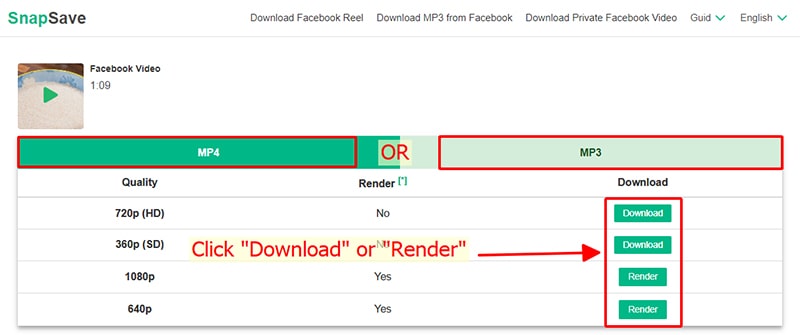
Step 3: Download Video to Device
Select format (MP4/MP3) and click Download. For high quality, click Render and wait a few seconds.
Note
- For HD+ quality, SnapSave downloads video and audio separately then merges them. This may take a few seconds to process.
- Encountering a 'Private Video' error? Simply switch to our Private Facebook Downloader and follow the instructions to save restricted content easily.
- While using SnapSave, if you encounter any problems, please contact us to have them fixed immediately: contact@snapsave.ai